Team Activity Digest
Overview
The digest feature generates a daily summary of a GitHub repository's activity and posts it to a Slack channel. It reads pull requests and commits from the previous day, summarises each contributor's work using an LLM, and surfaces highlights and potential blockers in a structured Slack message.
It can be triggered in two ways:
- Automatically via a configurable cron schedule (opt-in per application)
- Manually via the
/digestSlack slash command (restricted to allowed users)
Architecture
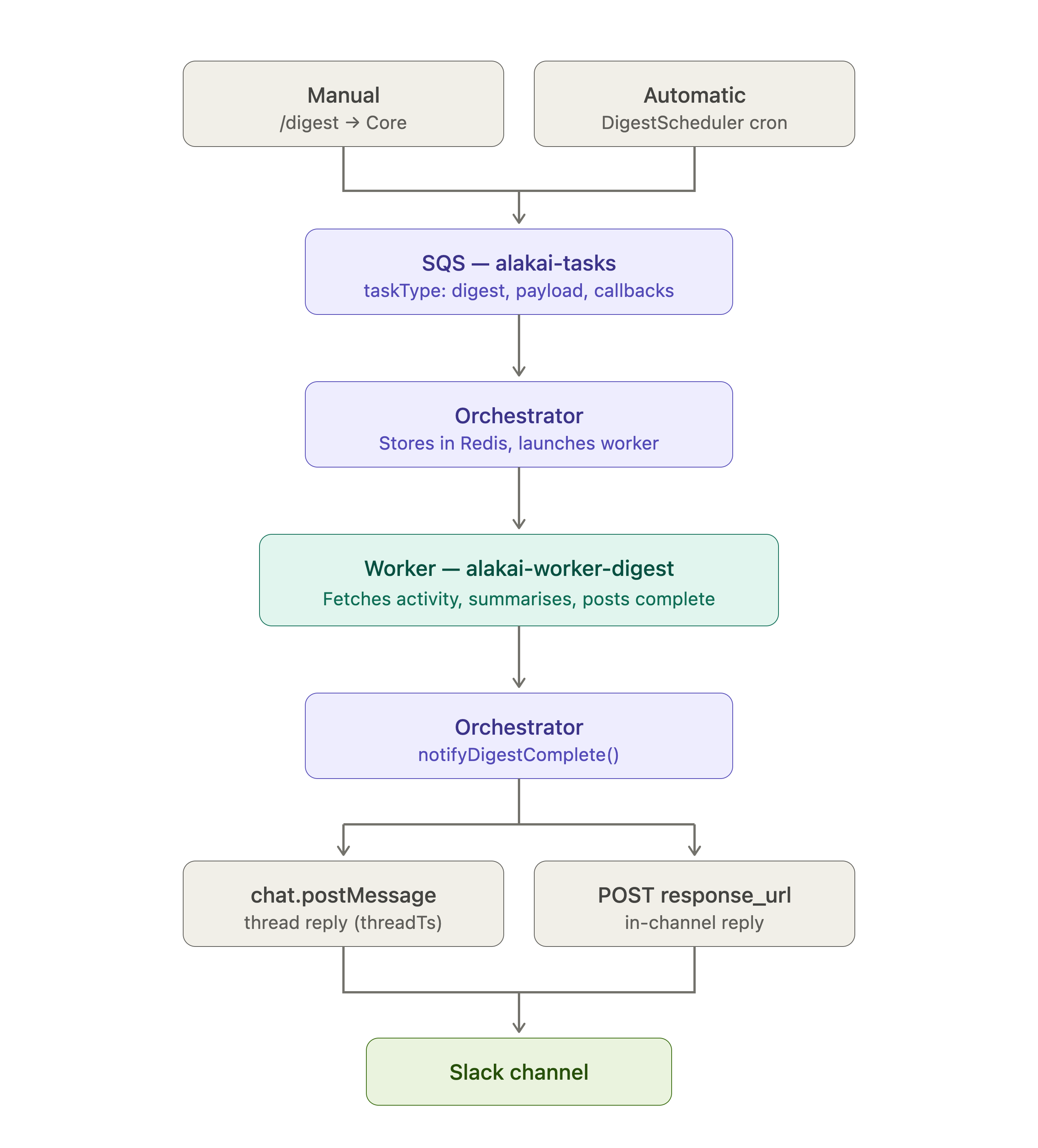
Slash command flow (with SLACK_BOT_TOKEN configured in Core):
- Core receives
/digest, posts"Generating digest for X…"as a public message, capturesthread_ts - Enqueues SQS task with
callbacks.slack.{ channelId, threadTs } - Returns immediately (empty 200 to Slack)
- Worker runs, orchestrator replies in the thread via
chat.postMessage+thread_ts
Cron flow (no slash command involved):
DigestSchedulerfires based on the configured schedule- Core posts
"Generating digest for X…"toslackChannelId(bot token required) - Enqueues SQS task with
callbacks.slack.{ channelId }— nothreadTs, noresponseUrl - Worker runs, orchestrator posts the result to
channelIdviachat.postMessage
Configuration
Digest is configured per application in config.json (or S3 equivalent). applyDigest is a field inside the digest object:
{
  "projects": {
    "my-project": {
      "applications": {
        "my-app": {
          "repo": "owner/repo",
          "slackChannelIds": ["C0123ABCD"],
          "digest": {
            "applyDigest": true,
            "slackChannelId": "C0123ABCD",
            "timezone": "America/New_York",
            "scheduleHour": 9,
            "scheduleDays": ["Mon", "Tue", "Wed", "Thu", "Fri"],
            "verbosity": "detailed",
            "cronEnabled": false,
            "allowedSlackUserIds": ["U0123ABCD", "U0456EFGH"]
          }
        }
      }
    }
  }
}
Fields
| Field | Type | Required | Default | Description |
|---|---|---|---|---|
slackChannelIds (app, top-level) | string[] | No | [] | Channel IDs for inbound Slack command routing (C...). Not part of digest. |
digest.applyDigest | boolean | Yes | — | Enables digest for this application. Must be true. Lives inside the digest object. |
digest.slackChannelId | string | Yes | — | Target channel for cron-triggered digests. Accepts channel IDs (C...) or names (#general). |
digest.timezone | string | Yes | — | IANA timezone string (e.g. "America/New_York"). Used for schedule and date calculations. |
digest.scheduleHour | number | Yes | — | Hour of day to run the cron (0–23, in timezone). |
digest.scheduleDays | string[] | No | ["Mon"…"Fri"] | Days of the week to run the cron. Accepts Mon, Tue, Wed, Thu, Fri, Sat, Sun. |
digest.verbosity | "brief" | "detailed" | No | "detailed" | Controls LLM summarisation depth. |
digest.cronEnabled | boolean | No | false | Set to true to activate automatic cron scheduling. Cron is disabled by default. |
digest.allowedSlackUserIds | string[] | No | — | Slack user IDs allowed to run /digest manually. If absent or empty, no one can trigger the command. |
Access control
The /digest slash command is gated by digest.allowedSlackUserIds:
- List absent or empty → command is blocked for everyone
- List set → only listed users can trigger it, in any environment
To find a user's Slack ID: open their profile in Slack → … menu → Copy member ID (format: U0XXXXXXX).
Environment Variables
Core
| Variable | Required | Description |
|---|---|---|
SLACK_BOT_TOKEN | Yes (for threading) | Bot token used to post the "Generating digest…" message and create the reply thread. Without it, delivery falls back to response_url. |
DIGEST_SQS_QUEUE_URL | Yes | SQS queue URL for digest tasks. |
Orchestrator
| Variable | Required | Description |
|---|---|---|
SLACK_BOT_TOKEN | Yes | Bot token used to post the final digest result. Must be the same app token as Core's. |
DIGEST_WORKER_TASK_DEFINITION | Yes (non-local) | ECS task definition for the digest worker. |
DIGEST_WORKER_CONTAINER_NAME | No | Container name override. Defaults to "worker". |
Worker (workers/digest)
| Variable | Required | Default | Description |
|---|---|---|---|
TASK_ID | Yes | — | Task ID from Redis. Set by ECS env or manually for local runs. |
ORCHESTRATOR_URL | Yes | — | URL of the orchestrator service. |
GITHUB_TOKEN | Yes | — | GitHub personal access token or App token for fetching activity. |
DIGEST_OPENAI_API_KEY | Yes | — | OpenAI API key for LLM summarisation. |
DIGEST_MAX_TOKENS_PER_UNIT | No | 8000 | Token budget per contributor before diff truncation. |
DIGEST_PARALLEL_LIMIT | No | 5 | Max parallel contributor summaries. |
Testing the Feature End-to-End
Prerequisites
Make sure the following are running locally:
-
LocalStack (SQS):
cd .local-awsdocker compose up -d -
Core:
cd coremake devRequired
.enventries:ENV=localSLACK_SIGNING_SECRET=...SLACK_BOT_TOKEN=xoxb-...DIGEST_SQS_QUEUE_URL=http://localhost:4566/000000000000/alakai-tasksAWS_ACCESS_KEY_ID=testAWS_SECRET_ACCESS_KEY=test -
Orchestrator:
cd orchestratormake devRequired
.enventries:ENV=localPORT=3001SLACK_BOT_TOKEN=xoxb-... # same token as CoreSQS_QUEUE_URL=http://localhost:4566/000000000000/alakai-tasksREDIS_URL=redis://localhost:6379AWS_ACCESS_KEY_ID=testAWS_SECRET_ACCESS_KEY=testORCHESTRATOR_URL=http://localhost:3001 -
Redis: must be reachable at
REDIS_URL.
Path A — Slash command (thread reply)
- Add your Slack user ID to
digest.allowedSlackUserIdsinconfig.json - Restart Core
- Run
/digest project=my-project [app=my-app] date=YYYY-MM-DDfrom any Slack channel the bot is in - Slack shows a public
"Generating digest for …"message - Watch Orchestrator logs for the new task ID
- Update
workers/digest/.envwithTASK_ID=<uuid> - Run the worker:
cd workers/digestmake run-once
- The digest appears as a thread reply in Slack
Path B — Slash command via Makefile (no Slack app needed)
cd core
make call-slack-digest project='my-project' date='YYYY-MM-DD'
Then follow steps 5–8 from Path A above.
Path C — Cron simulation (standalone channel message)
- Ensure
digest.slackChannelIdinconfig.jsonis set to a real channel the bot is in - Trigger the cron simulation:
cd coremake call-digest-cron repo='owner/repo' date='YYYY-MM-DD'
- Watch Orchestrator logs for the task ID, then run the worker:
cd workers/digest# update TASK_ID in .envmake run-once
- The digest appears as a new standalone message in the configured channel
Verifying Redis state
redis-cli -u $REDIS_URL get "${REDIS_KEY_PREFIX}:<taskId>"
The JSON value contains payload (repo, date, digestConfig) and callbacks (channelId, threadTs, etc.).
Common issues
| Symptom | Likely cause | Fix |
|---|---|---|
channel_not_found from orchestrator | Wrong SLACK_BOT_TOKEN in orchestrator (different app than Core) | Use the same xoxb-… token in both services |
Worker logs task not found in Redis | Wrong REDIS_KEY_PREFIX or mismatched TASK_ID | Check REDIS_KEY_PREFIX matches between orchestrator and worker |
You don't have permission in Slack | User ID not in digest.allowedSlackUserIds | Add the user's Slack ID to config.json |
| Cron never fires | digest.cronEnabled: false | Set digest.cronEnabled: true and restart Core |
| SQS credential errors | Missing LocalStack dummy credentials | Set AWS_ACCESS_KEY_ID=test and AWS_SECRET_ACCESS_KEY=test |