Background Task Orchestration Architecture
Overview
This document specifies a generic architecture for executing heavy, resource-intensive operations outside of the Core service. Tasks are queued, orchestrated, and executed in isolated ECS tasks with concurrency control.
First use case: The /implement command, which performs code generation using Codex SDK.
Future use cases: Any heavy processing that should be isolated from the Core service (e.g., large file processing, batch operations, long-running AI tasks).
Chaining workers into multi-step flows (e.g.
implementation → bug-hunter) is documented separately in Worker Pipeline.Listing and retrying failed executions from the dashboard is documented in Worker Execution Retry.
Problem Statement
Some operations are resource-intensive and can take several minutes to complete:
- Code implementation (cloning repos, running Codex SDK, creating PRs)
- Future: other heavy operations
Running these inside the Core Fargate task causes:
- Risk of affecting the entire Core service if the operation fails or hangs
- Resource contention between API handling and heavy processing
- No control over concurrent executions
Goals
- Isolation: Task failures should not affect the Core service
- Concurrency control: Configurable limit on simultaneous task executions (default: 5)
- Reliability: Messages should not be lost if components restart
- Extensibility: Easy to add new task types without changing the orchestration layer
- Simplicity: Minimal operational complexity
Architecture
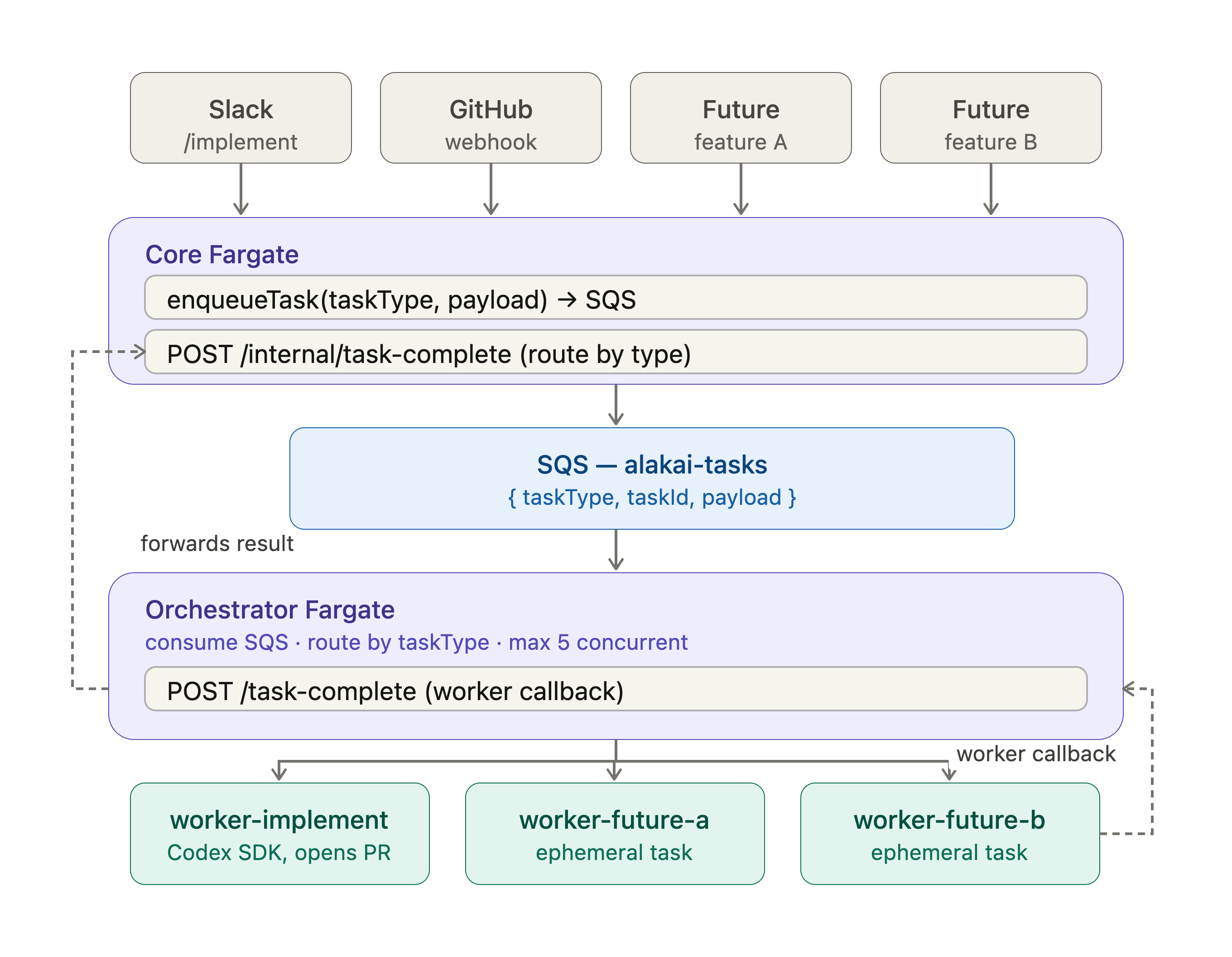
Components
1. Core Fargate (existing, modified)
Changes required:
- Create a generic
enqueueTask(taskType, payload)function - Add endpoint
POST /internal/task-completethat routes bytaskType - Respond immediately with "queued" status
Generic SQS Message Format:
interface BackgroundTask<T = unknown> {
  taskId: string;           // Unique identifier (UUID)
  taskType: string;         // e.g., "implement", "batch-process", etc.
  payload: T;               // Task-specific payload
  metadata: {
    createdAt: number;      // Timestamp
    source: string;         // e.g., "slack", "github-webhook", "api"
    correlationId?: string; // For tracing
  };
  callbacks: {
    slackResponseUrl?: string;
    slackChannelId?: string;
    githubIssueNumber?: number;
    webhookUrl?: string;    // Generic callback URL
  };
}
2. SQS Queue
Configuration:
| Setting | Value | Reason |
|---|---|---|
| Type | Standard | Order not critical, need high throughput |
| Visibility Timeout | 60 seconds | Time for orchestrator to process and delete |
| Message Retention | 24 hours | Allow recovery from extended outages |
| Receive Wait Time | 20 seconds | Long polling to reduce empty receives |
| Dead Letter Queue | Yes | Capture failed messages after 3 attempts |
Queue Name: alakai-tasks
DLQ Name: alakai-tasks-dlq
3. Orchestrator Fargate
Purpose: Dedicated service that consumes SQS messages, routes to appropriate worker task definitions, and enforces concurrency control.
Resources:
- CPU: 256 (0.25 vCPU)
- Memory: 512 MB
- Always running (24/7)
- Estimated cost: ~$8-10/month
Task Type Registry:
const TASK_REGISTRY: Record<string, TaskTypeConfig> = {
  'implement': {
    taskDefinition: 'alakai-worker-implement',
    containerName: 'worker',
    maxConcurrent: 5,
    timeoutMinutes: 30,
  },
  // Add new task types here
};
Endpoints:
| Endpoint | Method | Purpose |
|---|---|---|
/health | GET | Health check for ECS |
/task-complete | POST | Callback from workers when done |
/status | GET | Return current state (active tasks by type) |
4. Worker Tasks
Purpose: Ephemeral tasks that perform specific work and terminate. Each task type has its own task definition.
Naming Convention:
- Task Definition:
alakai-worker-{taskType}(e.g.,alakai-worker-implement) - Log Group:
/ecs/alakai/workers/{taskType}
Common environment variables passed to all workers:
TASK_ID              - Unique task identifier
TASK_TYPE            - Type of task (e.g., "implement")
ORCHESTRATOR_URL     - URL to call when complete
CORE_URL             - URL of Core service (optional, for direct callbacks)
PAYLOAD_JSON         - JSON-encoded task-specific payload
Adding a new task type
To add a new task type (e.g., batch-export):
- Define the payload type in Core
- Create the worker (new task definition or shared image)
- Register in orchestrator (
TASK_REGISTRYin orchestrator config) - Add handler in Core for completion (
POST /internal/task-complete)
AWS resources
| Resource | Name | Purpose |
|---|---|---|
| SQS Queue | alakai-tasks | Generic task queue |
| SQS Queue | alakai-tasks-dlq | Dead letter queue |
| ECS Task Definition | alakai-orchestrator | Orchestrator service |
| ECS Service | alakai-orchestrator-service | Run orchestrator 24/7 |
| ECS Task Definition | alakai-worker-implement | Implement worker |
| CloudWatch Log Group | /ecs/alakai/orchestrator | Orchestrator logs |
| CloudWatch Log Group | /ecs/alakai/workers/implement | Implement worker logs |
Cost estimate
| Component | Monthly Cost |
|---|---|
| Orchestrator Fargate (256 CPU, 512 MB, 24/7) | ~$8-10 |
| SQS (estimated 1000 messages/month) | ~$0.50 |
| Worker executions (100 runs @ 10 min each) | ~$5-8 |
| CloudWatch Logs | ~$2-5 |
| Total additional cost | ~$15-25/month |
Monitoring
| Metric | Source | Alert Threshold |
|---|---|---|
| Queue depth | SQS | > 20 messages for 10 min |
| DLQ messages | SQS DLQ | > 0 |
| Orchestrator CPU | ECS | > 80% for 5 min |
| Worker failures by type | Custom metric | > 3 in 1 hour |
See Tracing Guide for CloudWatch Logs Insights queries to trace executions.