CloudWatch Logs (/logs)
Overview
The /logs feature lets the team query AWS CloudWatch Logs Insights directly from Slack and get a natural-language answer, without opening the AWS console.
A user runs /logs with a target project, application, environment and a free-text question. Core resolves the project+app+env to its configured CloudWatch log groups, runs the question through an OpenAI agent that builds and executes a Logs Insights query, and posts the analysis back to the channel.
Typical uses:
- Triage an incident ("the app is failing, what errors are there?")
- Count or summarise errors over a window ("how many 5xx in the last hour?")
- Post-mortem over an absolute time range
Command syntax
/logs project=<project> app=<app> env=<env> [last=<duration> | from=<datetime> to=<datetime>] query=<question>
| Parameter | Required | Description |
|---|---|---|
project | Yes | Project slug as configured in config.json (e.g. time-off). Case-insensitive. |
app | Yes | Application slug within the project (e.g. time-off). Case-insensitive. |
env | Yes | Environment key as configured under the application's logs (e.g. dev, qa, prod). |
last | No | Relative window from now: 30m, 1h, 90m, 2h. Only m (minutes) and h (hours). Mutually exclusive with from/to. |
from | No | Absolute start, YYYY-MM-DDTHH:mm (UTC if no timezone). Requires to. |
to | No | Absolute end, same format. Requires from. |
query | Yes | Natural-language question. Greedy — captures everything after query= to the end (no quotes needed). |
If no time parameter is given, the default window is CLOUDWATCH_DEFAULT_TIME_RANGE_MINUTES (60 min). The window may not exceed CLOUDWATCH_MAX_TIME_RANGE_MINUTES (180 min).
Examples
/logs project=time-off app=time-off env=dev last=30m query=show me all errors
/logs project=time-off app=time-off env=prod query=show me the latest errors
/logs project=payments app=payments env=prod from=2026-05-26T10:00 to=2026-05-26T11:30 query=what caused the spike?
Architecture
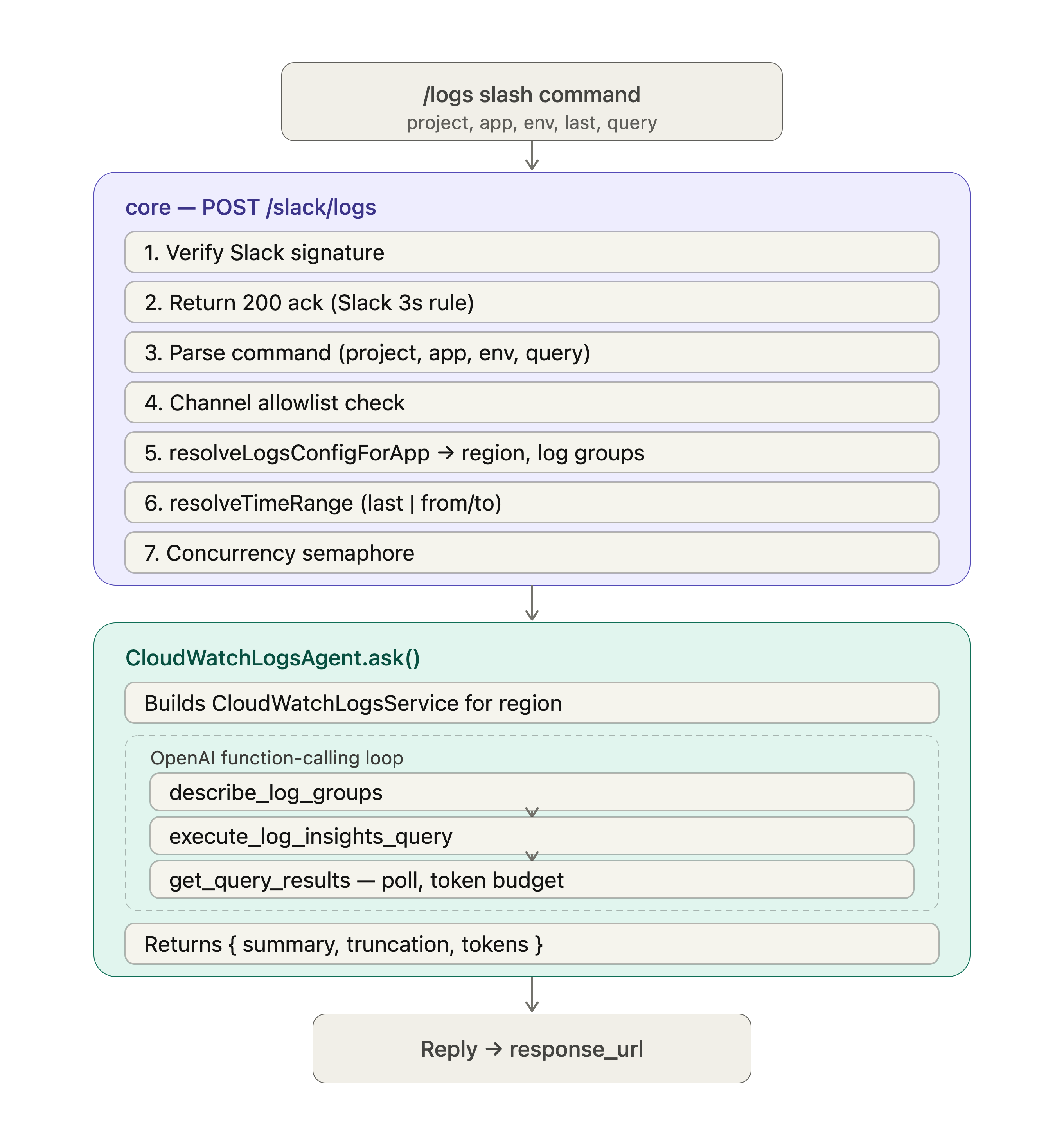
Configuration
Log groups are configured per application, per environment in config.json under each application's logs key:
{
  "projects": {
    "time-off": {
      "applications": {
        "time-off": {
          "repo": "houlak/time-off",
          "logs": {
            "dev": {
              "awsAccountId": "123456789012",
              "awsRegion": "us-east-1",
              "logGroups": ["/aws/lambda/time-off-dev", "/ecs/time-off/dev"]
            },
            "prod": {
              "awsAccountId": "868178926296",
              "awsRegion": "us-east-1",
              "logGroups": ["/ecs/time-off/prod"]
            }
          }
        }
      }
    }
  }
}
Fields
| Field | Type | Required | Description |
|---|---|---|---|
awsAccountId | string | Yes | AWS account that owns the log groups (documented for auditing). |
awsRegion | string | Yes | Region of the log groups. The query uses this region — must match where the log groups actually live. |
logGroups | string[] | Yes (non-empty) | Exact CloudWatch log group names (not ARNs). |
The integration is enabled at startup only if at least one application has a non-empty
logsmap.
Environment variables
| Variable | Default | Description |
|---|---|---|
CLOUDWATCH_DEFAULT_TIME_RANGE_MINUTES | 60 | Window used when no last/from/to is given. |
CLOUDWATCH_MAX_TIME_RANGE_MINUTES | 180 | Maximum allowed window. |
CLOUDWATCH_MAX_RESULT_ROWS | 50 | Max rows CloudWatch Logs Insights returns. |
CLOUDWATCH_QUERY_TIMEOUT_SECONDS | 30 | Polling timeout for query results. |
CLOUDWATCH_MAX_CHARS_PER_ROW | 500 | Per-field clip length; longer values get …[truncated]. |
CLOUDWATCH_MAX_TOTAL_INPUT_CHARS | 20000 | Total chars of log data sent to the model. Surplus rows are dropped. |
CLOUDWATCH_MAX_CONCURRENT_QUERIES | 5 | In-process concurrency semaphore for /logs. |
CLOUDWATCH_MAX_AGENT_TURNS | 10 | Max agent tool-call turns before the loop stops. |
CLOUDWATCH_ALLOWED_SLACK_CHANNEL_IDS | "" | Comma-separated channel allowlist. Empty = allow all channels. |
CLOUDWATCH_OPENAI_API_KEY | OPENAI_API_KEY | Feature-specific OpenAI key; falls back to OPENAI_API_KEY. |
CLOUDWATCH_OPENAI_MODEL | OPENAI_MODEL | Feature-specific model; falls back to OPENAI_MODEL. |
IAM permissions
The ECS core task role needs:
logs:DescribeLogGroups, logs:StartQuery, logs:StopQuery, logs:GetQueryResults (Resource: *)
This is managed by CDK in the houlak-cdk repo (lib/stacks/alakai/constructs/alakai-roles.ts). Deploy:
# Sandbox
ENV=sandbox npx cdk deploy AlakaiStack-sandbox --profile houlak

# Prod (after validating in sandbox)
ENV=prod npx cdk deploy AlakaiStack-prod --profile houlak
IAM policy changes take effect immediately — no ECS redeployment required.
Setup checklist
- IAM — deploy the CDK change to add
logs:*permissions to the core task role. - Config — add a
logsblock to the relevant applications inconfig.json. - (Optional) tuning — add
CLOUDWATCH_*env vars to the core container in CDK if overriding defaults. - Slack — register the
/logsslash command pointing toPOST /slack/logs.
Testing locally
Dry run (no AWS / no OpenAI)
cd core
make logs-dry PROJECT=time-off APP=time-off ENV=prod QUERY="dummy"
Real query (calls AWS + OpenAI)
cd core
export AWS_PROFILE=<profile>
make logs-test PROJECT=time-off APP=time-off ENV=prod LAST=30m QUERY="show me the latest errors"
# Or with absolute window:
make logs-test-range PROJECT=time-off APP=time-off ENV=prod FROM=2026-06-03T11:00 TO=2026-06-03T12:00 QUERY="what failed?"
HTTP end-to-end (POST /slack/logs)
Prerequisites:
- Redis on
localhost:6379:docker run --rm -p 6379:6379 redis:7 - Server with config from file:
cd core && export AWS_PROFILE=<profile> && REPO_WORKFLOW_CONFIG_SOURCE=file yarn dev
- A local listener for
response_url:node -e 'require("http").createServer((q,r)=>{let b="";q.on("data",c=>b+=c);q.on("end",()=>{console.log(b);r.end("ok")})}).listen(4000)'
Run:
cd core
make call-slack-logs project='time-off' app='time-off' env='prod' last='30m' \
  query='show me the latest log entries' response_url='http://localhost:4000/'
Common issues
| Symptom | Likely cause | Fix |
|---|---|---|
CloudWatch integration is not configured | No application has a logs block, or server loaded config from S3 | Add logs to an application; run with REPO_WORKFLOW_CONFIG_SOURCE=file locally |
No logs configuration found for project/app … | project/app/env doesn't match config.json | Check the project and app slugs and that awsRegion is present |
ResourceNotFoundException | Log group name wrong, or wrong region | Verify the name with aws logs describe-log-groups; ensure awsRegion matches |
AccessDeniedException | Task role / local identity lacks CloudWatch perms | Add the 4 logs:* permissions |
| Query timed out | Query exceeded CLOUDWATCH_QUERY_TIMEOUT_SECONDS | Shorten the range or raise the timeout |
Server crashes on startup with ECONNREFUSED :6379 | Redis not running | Start Redis (see prerequisites) |