How to E2E test the ClickUp Alakai Ready flow locally (V2)
This guide covers the V2 ClickUp integration:
- Trigger is
taskStatusUpdated→ statusAlakai Ready(no longertaskCreated). - Routing key is the
webhook_idin the payload → aclickup.lists[].webhookIdentry. - The webhook payload carries no task body, so the handler always does a follow-up
GET /api/v2/task/{id}?custom_fields=true. A real PR therefore requires a realtask_idplus a bot token that can read it — you can't fake the whole thing offline. - Optional platform routing sends one shared list to multiple repos via a
Platformdropdown custom field.
The older guide
test-clickup-task-prompt-pr-locally.mdcovered the removed V1taskCreatedflow and is now a deprecation stub pointing here.
There are five paths, fastest first. Pick based on what you're validating before opening the PR:
| Path | What it proves | Needs ClickUp? | Needs public URL? | Time |
|---|---|---|---|---|
| 0 — Automated tests | Routing logic, gates, secret resolution | No | No | 1 min |
| A — Gate smoke test | Event/status/webhook gates discard correctly | No | No | 5 min |
| B — Hybrid local E2E | Real task fetch → real PR, manual webhook delivery | Yes (read) | No | 15 min |
| C — Full E2E (prompt-PR) | Registration (/init or CLI) + real status transition → docs(prompts): PR | Yes (read+admin) | Yes (ngrok) | 25 min |
| D — Full E2E (direct implementation) | Alakai stage = Implementation → SQS → worker opens a real PR → PR-URL comment-back | Yes (read+admin) | Yes (ngrok) | 35 min |
V2 added the
Alakai stagefork. A task atAlakai ReadywithAlakai stage = Implementationskips prompt generation and thedocs(prompts):PR, and launches the implementation agent directly from the task spec. Path D is the full E2E for that path; Paths A–C cover thePrompting(default) behavior, which is unchanged.
Path 0 — Run the automated tests first
This is the cheapest gate and covers the routing state machine and signature/secret logic.
cd core
yarn typecheck
yarn jest test/config/clickupRouting.test.ts test/interfaces/http/clickupWebhookRoute.test.ts
You should see the routing unit tests and the POST /clickup/webhook integration tests pass.
Run the whole suite (yarn jest) before opening the PR.
Prerequisites for the manual paths
- Alakai running locally —
cd core && yarn dev(listens on:3000). - Redis running — required for task tracking:
docker run -p 6379:6379 redis. - Local config file mode — in
.env:(OptionallyREPO_WORKFLOW_CONFIG_SOURCE=fileREPO_WORKFLOW_CONFIG_FILE_PATH=/abs/path/config.json; defaults tocore/config.json.) - GitHub access (Paths B/C only) —
GITHUB_APP_ID+GITHUB_APP_PRIVATE_KEY, or aGITHUB_TOKENwith push access to the target repo.
Local signing key
On each request the handler picks the HMAC key as CLICKUP_WEBHOOK_SECRETS[webhook_id].
There is no shared fallback secret — each webhook_id must have its own entry in the map.
For local testing, add an entry keyed by the webhook_id you intend to send:
CLICKUP_WEBHOOK_SECRETS={"EXAMPLE_WH_ID":"EXAMPLE_local_signing_value"}
You then sign each make call-clickup-task-status-updated invocation with the matching
per-webhook secret via the required secret= argument (e.g.
secret=EXAMPLE_local_signing_value), so the signature matches the key stored under that
webhook_id.
The route only mounts when a non-empty
CLICKUP_WEBHOOK_SECRETSmap is present. If/clickup/webhook404s, you forgot to set it.
Path A — Gate smoke test (fully local)
Proves the new gates (wrong_event_type, status_not_trigger, webhook_secret_missing,
webhook_not_mapped) without ClickUp or GitHub. No PR is produced — by design, a
non-Alakai Ready event never reaches the task fetch, and a fully-fake Alakai Ready event
fails the fetch (task_fetch_failed).
1. Minimal config.json
{
  "projects": {
    "demo": {
      "clickup": {
        "space": { "id": "90120056789" },
        "lists": [{ "id": "901200100", "name": "Backlog", "webhookId": "wh-local" }]
      },
      "applications": {
        "demo-app": {
          "repo": "your-org/your-repo",
          "baseBranch": "main",
          "workflows": { "clickupTaskPromptPr": true },
          "clickup": { "taskStatusTrigger": { "listId": "901200100" } }
        }
      }
    }
  }
}
2. Start the server
cd core && yarn dev
3. Fire the gate cases (second terminal in core/)
# Assumes CLICKUP_WEBHOOK_SECRETS contains {"wh-local":"EXAMPLE_local_signing_value"}.
# (a) Non-trigger status → discarded before any fetch (status_not_trigger)
make call-clickup-task-status-updated task_id='t1' webhook_id='wh-local' status='In Progress' secret=EXAMPLE_local_signing_value

# (b) Unknown webhook_id → 401 webhook_secret_missing (the webhook_id has no entry in the map)
make call-clickup-task-status-updated task_id='t2' webhook_id='wh-unknown' status='Alakai Ready' secret=EXAMPLE_local_signing_value

# (c) Trigger status, mapped webhook, but no real task → task_fetch_failed (needs bot token to even try)
make call-clickup-task-status-updated task_id='t3' webhook_id='wh-local' status='Alakai Ready' secret=EXAMPLE_local_signing_value
4. Verify in the server logs
| Case | Expected log event | HTTP |
|---|---|---|
| (a) | status_not_trigger (debug) | 200 |
| (b) | webhook_secret_missing (webhook_id absent from the map) | 401 |
| (c) | task_fetch_failed (no bot token, or task not found) | 200 |
No GitHub calls and no emitInProgress tracking event should fire in any of these.
Path B — Hybrid local E2E (recommended before opening the PR)
Produces a real prompt PR from a real ClickUp task, but delivers the webhook yourself with the Makefile target — so no ngrok and no webhook registration are needed. This is the fastest way to validate the full task-fetch → routing → PR → comment-back round trip.
1. Get a ClickUp bot token and a real task ID
- Generate a personal API token: ClickUp Settings → Apps → API. Put it in
.env:CLICKUP_BOT_API_TOKEN=<your-clickup-personal-token> - Create (or pick) a task in the list you'll map. The task ID is in the URL
https://app.clickup.com/t/<taskId>(also shown asCU-<taskId>).
2. Map the list in config.json
Use the single-application shape (no platform field). The webhookId is any string you
choose for local use — it just has to match what you pass to the target.
{
  "projects": {
    "demo": {
      "clickup": {
        "space": { "id": "90120056789" },
        "lists": [{ "id": "901200100", "name": "Backlog", "webhookId": "wh-local" }]
      },
      "applications": {
        "demo-app": {
          "repo": "your-org/your-repo",
          "baseBranch": "main",
          "workflows": { "clickupTaskPromptPr": true },
          "clickup": { "taskStatusTrigger": { "listId": "901200100" } }
        }
      }
    }
  }
}
3. Restart the server, then deliver the event
cd core && yarn dev
make call-clickup-task-status-updated \
  task_id='<realTaskId>' \
  webhook_id='wh-local' \
  status='Alakai Ready' \
  secret='<the secret stored under wh-local in CLICKUP_WEBHOOK_SECRETS>'
4. Verify
Server logs (in sequence):
Accepted ClickUp taskStatusUpdated webhook  { taskId: '<realTaskId>', webhookId: 'wh-local', listId: '901200100', repo: 'your-org/your-repo' }
Created prompt PR for ClickUp task          { prUrl: 'https://github.com/.../pull/...' }
GitHub — a PR titled docs(prompts): clickup-<realTaskId> appears, prompt file at
prompts/docs-prompts__clickup-<realTaskId>.md.
ClickUp — a bot comment on the task with the PR URL (and Platform: <label> if routed by platform).
5. (Optional) Test platform routing on a shared list
To exercise FR-005/007/009, add a Platform dropdown custom field to the task in ClickUp,
then read its field ID:
curl -s "https://api.clickup.com/api/v2/task/<realTaskId>?custom_fields=true" \
  -H "Authorization: $CLICKUP_BOT_API_TOKEN" \
  | jq '.custom_fields[] | select(.name=="Platform") | {id, options: .type_config.options}'
Then switch config.json to the shared-list shape and re-deliver the event:
{
  "projects": {
    "demo": {
      "clickup": {
        "space": { "id": "90120056789" },
        "lists": [{
          "id": "901200100",
          "name": "Backlog",
          "webhookId": "wh-local",
          "platformField": { "id": "<platform-field-id>", "name": "Platform" },
          "defaultApplication": "backend-app"
        }]
      },
      "applications": {
        "backend-app": {
          "repo": "your-org/backend-repo", "baseBranch": "main",
          "workflows": { "clickupTaskPromptPr": true },
          "clickup": { "taskStatusTrigger": { "listId": "901200100", "platformFieldValue": "backend" } }
        },
        "ios-app": {
          "repo": "your-org/ios-repo", "baseBranch": "main",
          "workflows": { "clickupTaskPromptPr": true },
          "clickup": { "taskStatusTrigger": { "listId": "901200100", "platformFieldValue": "ios" } }
        }
      }
    }
  }
}
Cases to check (restart the server after each config edit):
Task Platform value | Expected outcome |
|---|---|
ios | PR in your-org/ios-repo |
backend | PR in your-org/backend-repo |
a value with no matching app (e.g. android) | discarded, log platform_not_mapped |
field empty, defaultApplication set | PR in the default app (backend-app) |
field empty, defaultApplication removed | discarded, log platform_field_missing |
Duplicate guard (Story 2): re-deliver the same
task_idwithAlakai Readyagain — the branchdocs-prompts/clickup-<taskId>already exists, so Alakai logs the collision and does not open a second PR.
Path C — Full E2E with real registration + status transition
Validates the registration paths (/init clickupListId=… and the CLI list_id), the
Secrets Manager secret write, and a genuine status change in the ClickUp UI.
Before you start — set up config.json
Routing is driven by config, so the project, list, and application must exist before you
register the webhook. The list id here must be the real ClickUp list ID you'll register and
move tasks in. Keep REPO_WORKFLOW_CONFIG_SOURCE=file so the server reads this file.
{
  "projects": {
    "demo": {
      "clickup": {
        "space": { "id": "<your-space-id>" },
        "lists": [
          { "id": "901200100", "name": "Backlog" }
        ]
      },
      "applications": {
        "demo-app": {
          "repo": "your-org/your-repo",
          "baseBranch": "main",
          "workflows": { "clickupTaskPromptPr": true },
          "clickup": { "taskStatusTrigger": { "listId": "901200100" } }
        }
      }
    }
  }
}
Notes:
webhookIdis intentionally not shown yet — it's filled in step 3 after registration (/initwrites it automatically; with the CLI path you add it by hand).- For a shared list mapped to multiple repos, use the platform-routing shape from
Path B step 5 instead (add
platformField+defaultApplicationon the list andplatformFieldValueon each app). clickupTaskPromptPr: trueis required, or the event is discarded asrepo_disabled.
1. Expose your local server
ngrok http 3000
Copy the https://<sub>.ngrok-free.app forwarding URL.
2a. Register via the CLI (simplest)
cd core
make register-clickup-webhook \
  CLICKUP_BOT_API_TOKEN=<your-clickup-personal-token> \
  CLICKUP_WORKSPACE_ID=3030784 \
  ALAKAI_WEBHOOK_URL=https://<sub>.ngrok-free.app \
  list_id=901200100
The response prints the webhook id and secret. Note both. Registration is idempotent —
re-running with the same endpoint + list_id returns the existing webhook and creates no duplicate (FR-008).
2b. …or register via /init
If you're exercising the Slack path, run /init with the new argument:
/init project=demo repo=your-org/your-repo clickupListId=901200100
For /init to register, the local server needs CLICKUP_BOT_API_TOKEN, CLICKUP_WORKSPACE_ID,
ALAKAI_WEBHOOK_URL, and (to persist the secret) AWS_SECRETS_MANAGER_SECRET_ID. The list
(901200100) must already exist under the project's clickup.lists in config. The Slack reply
shows a ClickUp: line — registered, already registered, or skipped/failed with a reason
(FR-014). On success it writes webhookId onto the list entry (FR-013) and stores the HMAC
secret in the CLICKUP_WEBHOOK_SECRETS map in Secrets Manager.
3. Make the signing key available to the running server
Put the returned secret where the handler will find it for that webhook_id:
# Per-webhook map (matches production)
CLICKUP_WEBHOOK_SECRETS={"<webhook-id>":"<webhook-secret>"}
Then record the webhookId on the list entry in config.json — this is the routing key the
handler looks up:
"lists": [
  { "id": "901200100", "name": "Backlog", "webhookId": "<webhook-id>" }
]
CLI path (2a):
make register-clickup-webhookonly calls the ClickUp API — it does not touchconfig.json. You must addwebhookIdby hand as shown above./initpath (2b): thewebhookIdis written for you; you only need the signing key in.env.
Finally restart the server so it reloads the key and config.
4. Trigger from ClickUp
Move a task in that list to the Alakai Ready status. Within a few seconds you should get
the prompt PR on GitHub and a bot comment on the task. Moving it to any other status does nothing.
5. Clean up
ngrok URLs die on restart and stale webhooks add noise:
cd core
make remove-clickup-webhook webhook_id='<webhook-id>'
Then remove the local signing key entries from .env.
Path D — Full E2E for direct implementation (Alakai stage = Implementation)
Validates the whole new path: a real status transition in ClickUp → core reads Alakai stage
→ enqueues an inline-prompt implementation task on SQS → the orchestrator launches the worker
→ the worker opens a real PR → the orchestrator posts the PR URL back on the ClickUp task. It also
exercises the synchronous "started" comment and the refusal cases.
Topology — three processes + two async hops
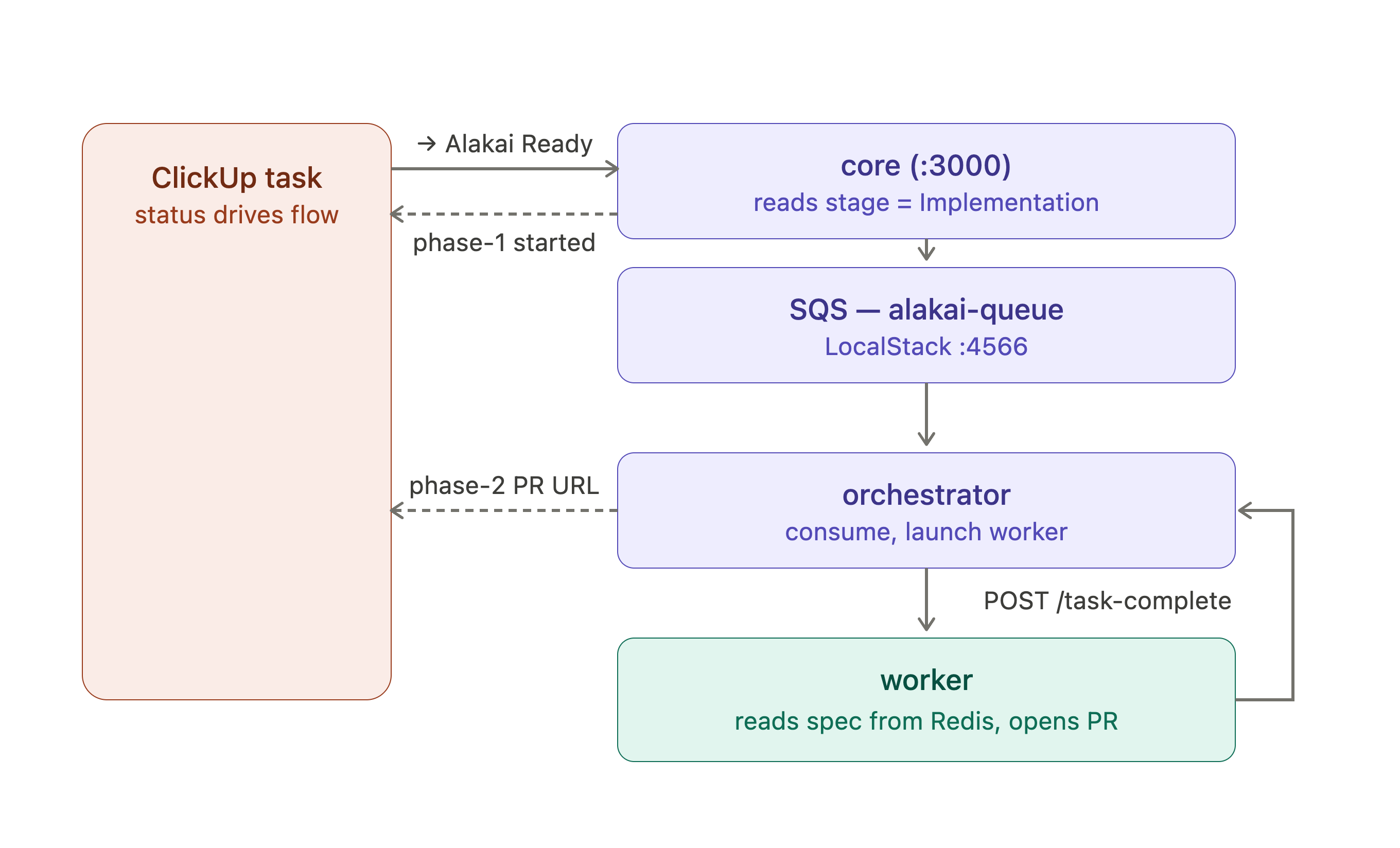
The ECS hop is the catch. With
ENV=localthe orchestrator skips ECS — instead of launching a container it stores the task in Redis and logs thetaskId. So locally there is one manual bridge: copy thattaskIdinto the worker and run it once (step 8). For a fully automatic run (no bridge, no ngrok), use the sandbox variant at the end of this path.
What goes in config.json
Identical to Path C — a project, a list with the registered webhookId, and one application with
clickupTaskPromptPr: true. There is no config for Alakai stage — it is matched on the task by
field name (case-insensitive), so nothing to wire here. clickupTaskPromptPr: true is still the
umbrella gate that enables ClickUp automation for the app; the field value alone then selects
direct implementation over prompt generation.
{
  "projects": {
    "demo": {
      "clickup": {
        "space": { "id": "<your-space-id>" },
        "lists": [
          { "id": "901200100", "name": "Backlog", "webhookId": "<webhook-id-from-registration>" }
        ]
      },
      "applications": {
        "demo-app": {
          "repo": "your-org/your-repo",
          "baseBranch": "main",
          "workflows": { "clickupTaskPromptPr": true },
          "clickup": { "taskStatusTrigger": { "listId": "901200100" } }
        }
      }
    }
  }
}
Prerequisites
- LocalStack (SQS) and Redis running:
cd .local-aws && make up && make infra # SQS queue alakai-queue @ :4566docker run -d -p 6379:6379 redis
- ngrok to expose core:
ngrok http 3000. - GitHub write access for the worker —
GITHUB_APP_ID+GITHUB_APP_PRIVATE_KEY(recommended) or aGITHUB_TOKENwith push access to the target repo. - An implementation-agent key —
CODEX_API_KEY(orOPENAI_API_KEY), or Cursor credentials. CLICKUP_BOT_API_TOKENin both core and the orchestrator — core posts the "started" comment, the orchestrator posts the PR-URL comment. They are separate processes with separate env.- Matching
REDIS_KEY_PREFIXacross orchestrator and worker, orrun-oncewon't find the task.
Per-process environment
core/.env
REPO_WORKFLOW_CONFIG_SOURCE=file
IMPLEMENTATION_SQS_QUEUE_URL=http://localhost:4566/000000000000/alakai-queue
CLICKUP_BOT_API_TOKEN=<clickup-personal-token>
CLICKUP_WEBHOOK_SECRETS={"<webhook-id>":"<webhook-secret>"}
# plus GitHub access for base-branch resolution (App creds or GITHUB_TOKEN)
orchestrator/.env
ENV=local
SQS_QUEUE_URL=http://localhost:4566/000000000000/alakai-queue
REDIS_URL=redis://localhost:6379
REDIS_KEY_PREFIX=alakai-sandbox
PORT=8080                                   # the orchestrator binds this; its default is 3000 — which COLLIDES with core
ORCHESTRATOR_URL=http://localhost:8080      # must match PORT above (and the worker's ORCHESTRATOR_URL)
CLICKUP_BOT_API_TOKEN=<clickup-personal-token>
Port gotcha. Both
coreand the orchestrator default toPORT=3000. Setting onlyORCHESTRATOR_URLdoes not change where the orchestrator listens — you must setPORTtoo. If the worker posts to:8080but the orchestrator came up on:3000, you'll see the worker open the PR fine and then fail withFailed to post task completion after retries: fetch failed.
workers/implementation/.env
REDIS_URL=redis://localhost:6379
REDIS_KEY_PREFIX=alakai-sandbox             # must equal the orchestrator's
ORCHESTRATOR_URL=http://localhost:8080      # the real orchestrator, so comment-back fires
TASK_ID=                                    # filled in step 8 from the orchestrator log
IMPLEMENTATION_AGENT_PROVIDER=openai
CODEX_API_KEY=<key>                         # or OPENAI_API_KEY / Cursor
GITHUB_APP_ID=<id>
GITHUB_APP_PRIVATE_KEY=<pem>
Steps
1. Bring up infra + config
Start LocalStack + Redis (above) and write config.json (above) with REPO_WORKFLOW_CONFIG_SOURCE=file.
2. Start core and expose it
cd core && yarn dev          # :3000
ngrok http 3000              # copy the https URL
3. Register the webhook
Use the CLI (idempotent) — same as Path C step 2a — pointing at the ngrok URL and your list_id:
cd core
make register-clickup-webhook \
  CLICKUP_BOT_API_TOKEN=<token> \
  CLICKUP_WORKSPACE_ID=<workspace-id> \
  ALAKAI_WEBHOOK_URL=https://<sub>.ngrok-free.app \
  list_id=901200100
Put the returned id/secret into config.json (webhookId) and core/.env
(CLICKUP_WEBHOOK_SECRETS), then restart core. (Or use /init per Path C step 2b, which writes
the webhookId for you.)
4. Create the Alakai stage field and a real task
In the ClickUp UI, on the list you registered:
- Add a dropdown custom field named exactly
Alakai stagewith optionsPromptingandImplementation(create it once; it can live at the list or space level). - Create a task, write the actual spec in the description (this becomes the agent's prompt —
title + description), and set
Alakai stage = Implementation.
The field is resolved by name, so you don't need its field ID. If you want to confirm it's set,
curl "https://api.clickup.com/api/v2/task/<id>?custom_fields=true" -H "Authorization: $CLICKUP_BOT_API_TOKEN" | jq '.custom_fields[] | select(.name=="Alakai stage")'.
5. Start the orchestrator
cd orchestrator && yarn dev # consumes the LocalStack queue, writes to Redis, serves /task-complete
6. Trigger from ClickUp
Move the task to the Alakai Ready status.
7. Watch core + the queue (first async hop)
- core logs:
Accepted ClickUp taskStatusUpdated webhook→implementation_enqueued(withrepo,baseRef,promptBytes). Notpr_created. - ClickUp: the task gets the phase-1 comment — "Alakai started direct implementation…".
- SQS (optional): before the orchestrator drains it,
cd .local-aws && make read-sqsshows a message whose body haspayload.prompt.type: "inline",payload.prompt.text= your spec,payload.source: "clickup_implement", andcallbacks.clickup.taskId.
8. Bridge to the worker (local-only manual step)
The orchestrator consumes the message and logs Worker launched and message deleted { taskId: '<uuid>', taskArn: 'local:task:skipped-ecs' }. Copy that taskId:
cd workers/implementation
# set TASK_ID=<uuid-from-orchestrator-log> in .env (or inline), then:
make run-once
The worker reads the spec from Redis, runs the agent, opens the PR, and POSTs to /task-complete.
9. Verify the second hop + comment-back
- GitHub: a real implementation PR is opened on
your-org/your-repo. - worker logs:
prompt resolved { promptSource: 'inline' }→provider launch completed→success result posted to orchestrator. - orchestrator logs:
Worker completed { status: 'success' }→clickup.implementation.comment_posted. - ClickUp: the task gets the phase-2 comment — "Alakai finished direct implementation: PR: …".
10. Exercise the refusal cases (no enqueue, comment only)
| Setup | Expected |
|---|---|
Alakai stage = Implementation, empty description | core logs missing_description, posts a "description required" comment, no SQS message |
| Description larger than ~230 KB | core logs spec_too_large, posts a "spec too large" comment, no SQS message |
Alakai stage = Prompting (or field unset) | falls through to the prompt-PR flow → docs(prompts): PR (Path C behavior) |
11. Clean up
cd core && make remove-clickup-webhook webhook_id='<webhook-id>'
cd ../.local-aws && make reset        # purge the queue
Remove the local signing key + tokens from the .env files.
Fully-automatic variant (sandbox, real ECS — no bridge, no ngrok)
The manual step 8 exists only because ENV=local skips ECS. In sandbox/prod the orchestrator
launches the worker as a Fargate task (injecting TASK_ID + REDIS_KEY_PREFIX), so the whole chain
runs hands-off. To validate there:
- Deploy core + orchestrator to sandbox (so the webhook reaches a stable URL — ngrok not needed; register the webhook against the deployed core URL).
- Ensure
CLICKUP_BOT_API_TOKENis in both services' secrets (the orchestrator task definition now references it — seeorchestrator/.aws/task_definition.json). - Move a task with
Alakai stage = ImplementationtoAlakai Ready. The PR and the PR-URL comment appear within a couple of minutes with no manual worker run.
Troubleshooting
| Symptom | Cause | Fix |
|---|---|---|
/clickup/webhook returns 404 | No signing key set, so the route never mounted | Set a non-empty CLICKUP_WEBHOOK_SECRETS map and restart |
401 invalid_signature | Signing key mismatch | Ensure the key used to sign matches CLICKUP_WEBHOOK_SECRETS[webhook_id] |
401 webhook_secret_missing | webhook_id not in the map | Add the secret under that webhook_id in CLICKUP_WEBHOOK_SECRETS |
status_not_trigger | Status wasn't Alakai Ready (case-insensitive) | Send status='Alakai Ready' / move the task to that status |
webhook_not_mapped | No clickup.lists[].webhookId equals the payload webhook_id | Add/align the webhookId on the list entry |
task_fetch_failed | Missing/invalid CLICKUP_BOT_API_TOKEN, or task not readable | Set a valid bot token; confirm the task ID exists |
ambiguous_application | Shared list, no platformField, multiple apps point at it | Add a platformField or reduce to one app for the list |
platform_not_mapped / platform_field_missing | No app matches the label / no value and no default | Add a matching platformFieldValue, or set defaultApplication |
repo_disabled | clickupTaskPromptPr not true | Set "clickupTaskPromptPr": true on the application |
| Config edits ignored | Still reading S3 | REPO_WORKFLOW_CONFIG_SOURCE=file and restart |
| No second PR on re-trigger | Expected — duplicate-branch guard | This is correct behavior, not a bug |
| (Path D) Prompt-PR opened instead of direct implementation | Alakai stage not set to Implementation, or field name doesn't match | Confirm the dropdown is named exactly Alakai stage and the selected option is Implementation |
(Path D) missing_description / spec_too_large | Direct path refused: empty description, or spec > ~230 KB | Add a description / trim it, then move the task back to Alakai Ready |
(Path D) No SQS message after Alakai Ready | IMPLEMENTATION_SQS_QUEUE_URL not pointed at LocalStack, or LocalStack down | Set it to the alakai-queue URL; cd .local-aws && make up && make infra |
(Path D) make run-once → No payload found in Redis | TASK_ID / REDIS_KEY_PREFIX mismatch with the orchestrator | Copy taskId from the orchestrator log; match REDIS_KEY_PREFIX in both |
(Path D) PR opens, then worker errors Failed to post task completion after retries: fetch failed | Worker ORCHESTRATOR_URL points where nothing is listening — usually the port collision: orchestrator came up on its default :3000 (clashing with core) while the worker posts to :8080, or .env.sample's http://orchestrator:3000 hostname doesn't resolve locally | Set the orchestrator's PORT (not just ORCHESTRATOR_URL) to a free port like 8080 and match the worker's ORCHESTRATOR_URL to it |
| (Path D) PR opens but no phase-2 ClickUp comment | CLICKUP_BOT_API_TOKEN missing on the orchestrator, or worker ORCHESTRATOR_URL points at the mock | Set the token on the orchestrator; point the worker at the real orchestrator |
(Path D) notify: "No notification handler for task type" | Worker sent a callback without top-level taskType (pre-fix worker) | Ensure the implementation worker sends the canonical { taskId, taskType, status, result } shape |
Key naming conventions
Prompting path (Paths A–C):
| Artifact | Pattern |
|---|---|
| PR title | docs(prompts): clickup-<taskId> |
| Branch | docs-prompts/clickup-<taskId> |
| Prompt file | prompts/docs-prompts__clickup-<taskId>.md |
Direct-implementation path (Path D): there is no docs(prompts): PR or prompt file — the worker
opens the implementation PR directly, and its branch/PR name come from the worker's implementation
branch-naming (derived from the task), not the docs-prompts/ pattern above.
Related docs
../workflows/clickup-task-prompt-pr.md— feature reference (update for V2 post-merge)../flows/clickup-automations.md— overview of ClickUp webhook flows